Avail.video · Watched for you · 1:56 video · 2 min read

Freefield: Open-Source Rebuild of Higgsfield on ComfyUI

Not enough channel history to compare

Freefield is an open-source reproduction of Higgsfield's generative video and image suite, implementing 95 of its 129 tools on ComfyUI with purely open weights. The project treats workflows as data manifests, runs entirely on user-controlled hardware without API nodes, and includes an automated GPU testing lab and memory profile map.

Read the teardown

How it earns the click and holds attention, second by second.

Find in this video

Search what was said and shown

One search covers the transcript, on-screen text, claims and references. Every result jumps to its moment.

    The explainer

    What the video says, with a link to every moment

    A 2-minute read. Each underlined phrase opens the video at that second.

    Freefield: An Open-Source Rebuild of Higgsfield on ComfyUI

    Freefield is an open-source, local-first studio designed as an open-weights reproduction of Higgsfield's AI video and media generation platform. Prompted by Higgsfield's stated intent to open-source its tooling, the developer created Freefield by rebuilding 95 of Higgsfield's 129 tools0:04 completely on ComfyUI workflows. Rather than depending on proprietary external APIs, the entire suite runs on local or cloud GPUs using open-source model weights.

    slide
    freefieldopen weights only · runs on your own GPU
    ▶ 0:06
    On screen at 0:06

    Modular Data Architecture and Execution Pipeline

    Freefield treats applications as declarative data. As shown in the codebase walkthrough, every app is defined in a single folder1:02 comprising a metadata manifest (`app.json`) and a native ComfyUI workflow (`workflow.api.json`). From this lightweight specification, Freefield automatically generates dynamic UI forms, model weight download manifests, test assertions, and VRAM requirement maps.

    slide
    AI INFLUENCER, ANIMATEDbuilt trait by trait on FLUX 3 Klein -> Use in -> Image to Video (LTX-2.5)
    ▶ 0:55
    On screen at 0:55

    The system execution architecture bridges standard web interfaces to backend compute without custom per-application glue code. In the architectural pipeline diagram1:54, web requests flow from the frontend browser through an intermediary TypeScript server (`server.ts` powered by Comfy SDK 0.5) and a Python gateway (`gateway.py`) that handles token management to immediately release GPU resources. The job is dispatched via `comfy-api-proxy` into ComfyUI instances hosted either on cloud serverless infrastructure such as Modal or directly on the user's local machine.

    slide
    github.com/neuregex/freefield#OpenSourceHiggsfield
    ▶ 1:50
    On screen at 1:50

    AI Capabilities and Video Generation Workflows

    The platform exposes an extensive catalog through the Freefield app catalog and studio interface0:14. Users can execute diverse generative tasks, including cinematic video synthesis, style transfer, and character replacement:

    slide
    CINEMA STUDIO VIDEOTHE SAME FILM LOOK, NOW MOVING
    ▶ 0:18
    On screen at 0:18
    slide
    CINEMA STUDIO · VIDEOFLUX 3 Klein draws the look, LTX-2.5 moves it: dolly in, one take
    ▶ 0:40
    On screen at 0:40

    Testing and Resource Optimization

    To ensure stability across disparate workflows, Freefield includes an automated evaluation harness. The built-in Modal GPU testing lab1:56 runs parallel batch executions across headless GPUs, having validated 710 out of 733 cases across 48 runs1:56. For hardware planning, the interactive VRAM map and hardware monitor1:56 breaks down peak memory consumption per generation phase, identifying which models can run within 24 GB consumer GPUs versus requiring 40 GB data center cards. Released under an MIT open-source license1:56, Freefield enables researchers and creators to self-host advanced generative video pipelines.
    Highlights
    1. 0:04Announcement of rebuilding 95 Higgsfield tools
    2. 0:18Cinema Studio video configuration
    3. 0:40Cinematic video generation result
    4. 0:46Multilingual dubbing and lip-sync demonstration
    5. 0:58Architecture explanation: apps defined as data
    Chapters across the 1:56 runtime

    Introduction to Freefield, a project rebuilding 95 of Higgsfield's generative AI tools on open weights and ComfyUI.

    0:000:12
    • 0:04MomentAnnouncement of rebuilding 95 Higgsfield tools
    • 0:06On screenfreefield · open weights only · runs on your own GPU
    How it's told

    A feature showcase guided by on-screen captions

    Format: Showcase. The video presents an open-source software release through synchronized screen recordings and generation samples. Kinetic on-screen captions explain the architecture, supported workflows, and GPU testing benchmarks.

    Story arc

    1. 0:00The PremiseAnnouncing the recreation of Higgsfield tools as open-source ComfyUI workflows.
    2. 0:11Product DemoShowing the Freefield UI, setup controls, and actual generation runs.
    3. 0:40Output GalleryHighlighting multiple multi-modal capabilities including style transfer, dubbing, and animation.
    4. 0:58Under The HoodExplaining the data-driven architecture, automated testing suite, and VRAM management.
    5. 1:50Call to ActionDisplaying the GitHub repository and open-source campaign tag.

    Setups and payoffs

    1. 0:02Setup Rebuilding 95 tools on ComfyUI
      ↳
      1:37Payoff Demonstrating complete zero-API-node open models running locally
    2. 0:18Setup Cinema Studio input parameters configured
      ↳
      0:40Payoff Full-motion cinematic video output shown

    Devices

    • Kinetic TextCentered high-contrast captions guiding the viewer through technical claims0:010:58
    • Comparison PipelineSide-by-side and before-and-after visual proof for dubbing and face swap0:460:52

    From the video's own structure, matched to the transcript and on-screen text.

    Teardown

    This video converts high-intent AI developers and creators by proving a massive claim within three seconds and sustaining interest through dense, unpadded visual evidence.

    No channel numbers to compare, so this says what the video does, not what worked · Long-form showcase · 0 days old, early

    The promise

    You will get a free, open-source recreation of Higgsfield's video generation tools running locally as 117 modular apps inside ComfyUI.

    Packaging

    How it looks in the feed

    Show the feed as
    1:56

    Freefield: Higgsfield rebuilt on ComfyUI #OpenSourceHiggsfield

    neuregex160 views · 9h agoFreefield: Higgsfield's creative apps rebuilt on ComfyUI, open weights only. 117 apps for image, video, VFX and audio, covering 95 of the 129 tools and apps…

    Views and age as of the teardown, Oct 28, 2026. Other videos are blanked out.

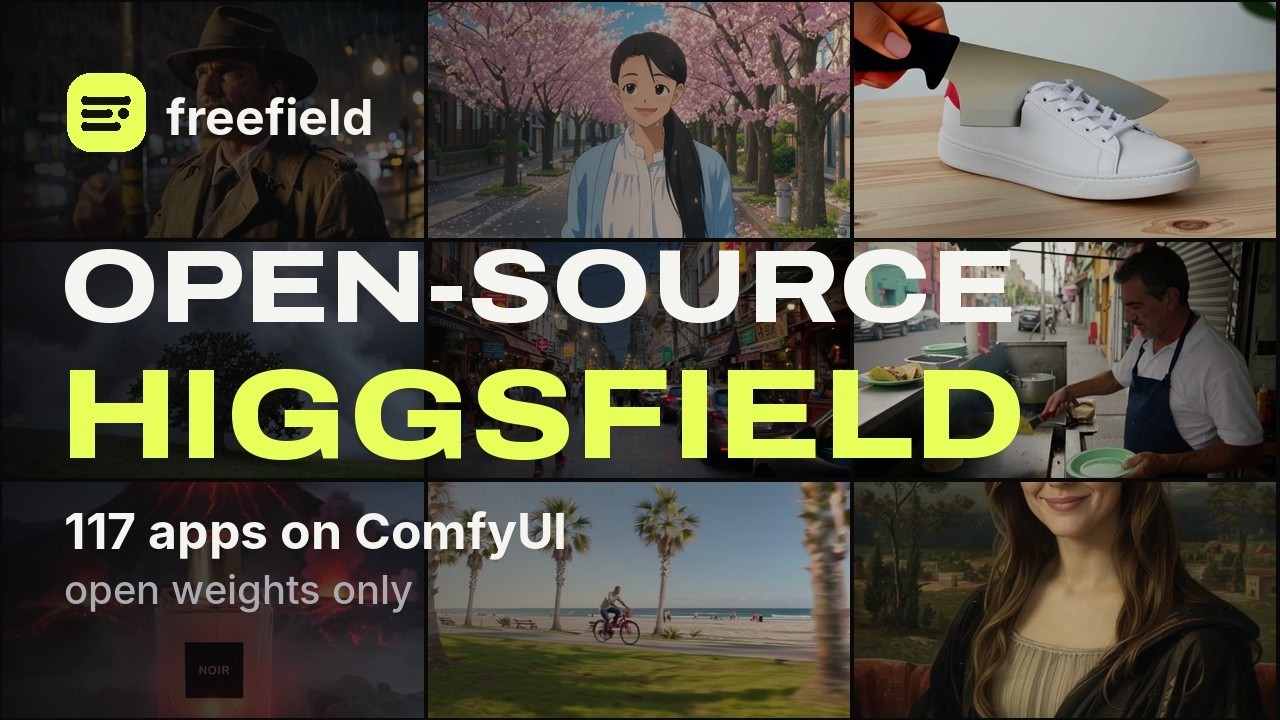
    • 3/5Thumbnail imageThe 3x3 grid demonstrates variety and output quality across multiple styles, but it lacks a single visual focal point. The sheer number of background tiles creates visual noise behind the text.A 9-panel grid displaying diverse video outputs, including an anime girl, a detective, a sneaker cake, and street scenes.
    • 4/5Thumbnail text“freefield OPEN-SOURCE HIGGSFIELD 117 apps on ComfyUI open weights only”The bold contrast on 'OPEN-SOURCE HIGGSFIELD' immediately flags high commercial value being given away for free. The subtext adds impressive scale with '117 apps' without cluttering the center.'freefield OPEN-SOURCE HIGGSFIELD 117 apps on ComfyUI open weights only' rendered in large white and neon yellow font.
    • 3/5TitleThe title directly names the tool and the target platform, leaving no confusion about the topic. It reads like a software release note rather than an engaging hook.'Freefield: Higgsfield rebuilt on ComfyUI #OpenSourceHiggsfield'
    • 4/5Title + thumbnailThe pair aligns tightly on delivering a proprietary platform's capabilities into an open ecosystem. The thumbnail provides the tangible scale (117 apps) while the title provides the formal project name.The title states Higgsfield is rebuilt on ComfyUI, while the thumbnail specifies 117 apps with open weights.

    Curiosity gap: How did someone manage to replicate a closed commercial AI video platform into 117 functional ComfyUI workflows for free?

    The three hooks

    The title, the thumbnail text and the first words spoken each make a promise, and each does a different job.

    • Title“Freefield: Higgsfield rebuilt on ComfyUI #OpenSourceHiggsfield”ResultsOutcomeNoveltyIt makes the viewer want to see proof that Higgsfield's proprietary features have actually been ported into ComfyUI.
    • Thumbnail text“OPEN-SOURCE HIGGSFIELD 117 apps on ComfyUI open weights only”System promiseOutcomeReliefNoveltyIt makes the viewer want free, local access to an expensive suite of AI video generation tools without paying platform subscription fees.
    • First words spokenNo spoken hook was labelled. The video may open without words.
    • PairingDifferent jobsThe thumbnail hooks viewers with the impressive volume of '117 apps' and high-contrast value proposition, while the title confirms the project name and platform.
    • StakesFitsThe video promises a free, open-source replacement of an expensive closed platform and backs it up with working code, exact model pipelines, and UI proof.
    • UrgencyNoneThe video operates as a standard open-source project launch announcement without false countdowns or manufactured FOMO.

    The first 20 seconds

    TimeWhat you seeWhat you hearWhat it does
    0:003x3 video grid showcasing AI generations with text: 'Higgsfield said they'd open source their platform.'Instrumental hip-hop beat begins with vocal chop sample.Hooks visual attention with high-end clips while referencing a well-known industry promise.
    0:01Knife cuts into sneaker to reveal cake; other AI video clips loop simultaneously across the grid.Beat continues.Displays visual proof of generation quality and diverse styles.
    0:02Volcano erupts behind perfume bottle; giant cloud figure moves across sky.Beat continues with steady rhythm.Builds momentum and anticipation for the punchline of the text.
    0:03Text flips to: 'So I rebuilt 95 of its 129 tools and apps on ComfyUI.'Beat drops into main groove.Delivers the core hook and massive value proposition.
    0:04Knife slices through cake sneaker while surrounding video tiles continue running.Beat continues.Lets the magnitude of the claim settle while viewer watches eye candy.
    0:05Video clips reset and loop; on-screen claim remains centered.Beat continues.Gives the viewer time to finish reading the numbers.
    0:06Screen blurs out the 3x3 video grid.Beat continues smoothly.Transitions from the teaser hook to the solution reveal.
    0:07'freefield' logo appears with subhead: 'open weights only · runs on your own GPU'.Beat continues.Names the project and delivers the key benefit of running locally.
    0:08Freefield logo holds over dark blurred background.Beat continues.Solidifies brand identity before entering the software.
    0:09Logo screen remains visible.Beat continues.Paces the reveal before opening the actual interface.
    0:10Logo fades out to transition into the web platform.Vocal sample rises in the mix.Bridges between the logo and live product screen.
    0:11Freefield web app dashboard appears with headline 'AN OPEN STUDIO FOR IMAGES, VIDEO AND SOUND'.Beat continues.Validates that the project is a real, polished application.
    0:12Dashboard categories shown: Image studio, Video studio, Audio, Apps, Library, VRAM map.Beat continues.Reveals the comprehensive scope of workflows available.
    0:13Cursor hovers top menu; banner text appears: 'Pick an app. Set the shot.'Beat continues.Clarifies how simple the workflow is to use.
    0:14Video dropdown menu opens showing extensive list of rebuilt tools and model engines.Beat continues.Provides hard proof of the 95 rebuilt tools.
    0:15List reveals models like LTX-Video, Wan 2.1, and various custom video effects.Vocal sample hums over beat.Excites ComfyUI users with familiar state-of-the-art open models.
    0:16Cursor hovers over 'Cinema Studio Video' option.Beat continues.Signals which specific tool will be demonstrated.
    0:17Click selects Cinema Studio Video; UI prepares workflow screen.Beat continues.Maintains fast momentum into the app view.
    0:18Cinema Studio Video app loads showing prompt parameters and noir film detective image.Beat continues.Shows real user controls (scene description, camera movement, tempo).
    0:19Preset cards and example gallery appear below the main prompt fields.Beat continues.Demonstrates plug-and-play presets for instant generation.
    0:20Cursor moves toward the camera movement controls and Generate button.Beat continues.Sets up the immediate demonstration of generating video.
    Click confirmation
    Immediately delivers. At 00:00 the on-screen text names Higgsfield, and by 00:03 confirms the full title promise of rebuilding it on ComfyUI.
    Time to the point
    0:03
    Hook
    bold claim, live demonstration
    Reason to stay
    The viewer wants to see if this free, local open-source suite actually delivers the same visual quality as Higgsfield and how easy it is to install.
    Missing on purpose
    No talking head, no channel introduction, no spoken preamble, and no subscribe callouts.
    Pace and texture
    Fast and punchy. Text hook over looping video grid wraps within 6 seconds, logo splash takes 4 seconds, and live UI demo starts by 00:11.

    Story map

    Transformation. An open-source developer wants to break a commercial AI platform's monopoly by rebuilding its features on local hardware, offering the suite to the community for free.

    TimeSectionNew tensionStakesTurnLoops
    0:00 –0:11The Hook & ClaimDid someone actually replicate Higgsfield's closed suite into open-source ComfyUI workflows?RiseHiggsfield did not open-source their platform, so the creator rebuilt 95 tools personally.Opens: Is this a real, usable software build or a conceptual mock-up?Closes: none
    0:11 –0:40Interface & Run SetupIs the interface practical and easy to use, or an unwieldy mess of ComfyUI spaghetti nodes?HoldThe interface is streamlined into clean, modular web apps, but viewers still need to see the actual render output.Opens: How good does the generated video actually look?Closes: Is this a real, usable software build or a conceptual mock-up?
    0:40 –0:58Feature Reel & ProofCan local open-source models handle complex tasks like anime styling, dubbing, and face-swapping?RiseThe results look clean, therefore demonstrating that commercial platforms are no longer strictly necessary for advanced video workflows.Opens: How is this architecture structured to run locally on consumer or cloud GPUs?Closes: How good does the generated video actually look?
    0:58 –1:56Technical Architecture & Code ReleaseIs this fragile and hard to deploy, or a production-ready repository?FallApps are treated as declarative JSON data rather than manual node spaghetti, therefore anyone can run tests and import workflows with a single line.Opens: noneCloses: How is this architecture structured to run locally on consumer or cloud GPUs?

    Payoff: delivered fully at 0:40. Delivers real generation outputs starting with the Cinema Studio result at 00:40, followed by a continuous gallery of working features up to the GitHub repository reveal. Ending: Ends on a GitHub URL slate and hashtag, driving viewers directly to clone the open-source repository.

    Leaks

    Where a viewer might leave. Guesses from watching, not retention data.

    • 0:58 The video shifts from creative eye candy to code manifests, system diagrams, and terminal batch-run statistics, which will shed casual viewers who only wanted tool demos.
    • 1:24 Showing test pass rates ('710 of 733 cases') appeals to software engineers but stalls visual momentum for everyday content creators.

    Steal this

    1. Deliver the counter-claim hook in text over dynamic output proof within the first 3 seconds. It pits the video against an industry giant immediately, anchoring attention before the software UI is even revealed. 0:00
    2. Provide full transparency on hardware, run time, and model ingredients directly on screen during outputs. Listing '100 s on an L40S' and naming the exact LoRAs removes skepticism about whether the clips were faked or pre-rendered elsewhere. 0:33
    3. Rapid-fire feature showcase using 2-second clips with explicit recipe tags. Demonstrates immense project scope and technical breadth in under twenty seconds without stalling pacing. 0:43

    Skip this

    • Silent, caption-only demonstration without voiceover or spoken explanation. Works here because the developer audience values rapid technical scanning and code receipts, but standard tutorials lose engagement without vocal energy.

    Open questions

    • What specific consumer GPU hardware (VRAM minimums) is required to run the heavy multi-model pipelines locally?
    • How difficult is the actual local setup and dependency installation compared to running standard ComfyUI?

    Teardown by Avail.video from the thumbnail, the title, the first 20 seconds and the report's notes on the whole video.

    On screen

    Everything the video showed you

    Slides, frameworks, quotes and formulas, captured verbatim with the moment they appeared. Tap any card to jump there.

    Reference shelf

    People, ideas and things mentioned

    Said means mentioned aloud; Shown means it appeared on screen.

    Organizations2

    • HiggsfieldGenerative video AI platform whose proprietary toolset inspired the Freefield rebuild.0:00Shown1:50Shown
    • LightricksTechnology company credited for creating the Day-to-Night IC-LoRA adapter.0:49Shown

    Things on screen8

    • FreefieldAn open-source AI studio application reproducing Higgsfield workflows using open weights and ComfyUI.0:06Shown0:07Shown0:12Shown1:50Shown
    • ComfyUINode-based visual interface and backend execution engine for diffusion and generative AI models.0:02Shown1:01Shown1:14Shown1:44Shown
    • FLUX 3 KleinOpen-weight image generation model utilized within Freefield for scene look drawing and face swap renders.0:40Shown0:43Shown0:52Shown0:55Shown1:37Shown
    • LTX-2.5Open-weight diffusion model used to animate still images into coherent video sequences.0:18Shown0:40Shown0:43Shown0:46Shown0:49Shown0:55Shown1:37Shown
    • MiniMax H3Open-weight video generation model used for video continuation and extension.1:30Shown1:37Shown
    • MiniMax Music 3Generative music model utilized to create the video's accompanying audio soundtrack.1:51Shown
    • ModalServerless cloud GPU platform utilized for running automated test harnesses and remote ComfyUI executions.0:33Shown1:12Shown1:18Shown
    • VRAM MapMemory footprint visualizer tracking GPU memory usage phase by phase across workflows.0:17Shown1:48Shown
    Video description

    A description you can paste into YouTube

    A hook, a summary, chapters in YouTube's format and what the video mentions. Copy it, edit it, and paste it into YouTube Studio.

    1,070 / 5,000 characters
    By the numbers

    What YouTube shows about this video and its channel

    As of Oct 28, 2026. YouTube's public numbers first, then Avail.video's own arithmetic on them.

    The video

    Views
    160
    Likes
    8
    Comments
    2
    Published
    Oct 27, 2026
    Length
    1:56
    Category
    People & Blogs
    YouTube's topics
    Technology
    Captions
    No
    HD
    Yes
    Language
    English
    Paid promotion
    None declared
    Made for kids
    No
    License
    Standard YouTube

    Creator's tags

    No tags

    The channel

    Subscribers
    5
    Videos
    1
    Total views
    0
    Channel age
    7 months (since Mar 2026)
    Country
    —
    Uploads
    —
    Before this video
    —

    Calculated by Avail.video from YouTube's public numbers

    Outlier score
    Not enough channel history
    Views per subscriber
    32.0
    Likes vs the channel's usual
    —
    Comments vs the channel's usual
    —
    Rank among recent uploads
    —
    Take it to your AI

    Ask Claude or ChatGPT about this video

    Copy this report as context, paste it into a chat, then ask anything. It includes timestamps, so answers can point back to the video.

    Then ask
    • Turn the main ideas into a checklist I can use this week.
    • What are the strongest claims in this video, and what evidence does it give for each?
    • Write a short summary for someone who hasn't watched it, linking the key moments.
    • Quiz me on this video, one question at a time, and cite the timestamp for each answer.

    Watched by Avail.video · 2026-10-28