Avail.video · Watched for you · 15:24 video · 1 min read

I Tested The Best E-Ink Writing Tablets: Kindle Scribe, Boox, & Supernote

Outlier score1.8×Above typical

680,796 views vs a median of 386,092 across the channel's last 11 long-form uploads · as of Oct 28

Avail.video calculation

Tired of desk clutter and paper notebooks, Betty from Switch and Click tests top e-ink writing tablets to find the best alternative to the subscription-gated reMarkable 2. She evaluates the Amazon Kindle Scribe Colorsoft, the Android-powered BOOX Go Color 7, and the modular Supernote Manta. While each tablet has noticeable trade-offs regarding battery life, lighting, and software usability, the Supernote emerges as the premier choice for distraction-free organization and natural writing.

Read the teardown

How it earns the click and holds attention, second by second.

Find in this video

Search what was said and shown

One search covers the transcript, on-screen text, claims and references. Every result jumps to its moment.

    The explainer

    What the video says, with a link to every moment

    A 1-minute read. Each underlined phrase opens the video at that second.

    Drowning in scattered paper notebooks and to-do lists, the host sets out to find an all-in-one digital paper replacement. While the reMarkable 2 writing experience0:16 was initially pleasant, its costly monthly subscription requirement to search notes and add hyperlinks—on top of an already steep $400 device—prompted a search for better alternatives across three major competitors.

    The first contender tested is the Kindle Scribe lineup2:05. Amazon provided the color version, which boasts an eraser-tipped pen included by default and an 11-inch diagonal screen4:01 that provides more screen real estate than the reMarkable 2. However, the Kindle Scribe writing feel8:12 proves overly slippery on the glass, lacking authentic paper resistance. More critically, its note organization is rudimentary, lacking tags or page indexing, and annotating within ebooks5:25 turns notes into detached floating objects that cannot be reviewed effectively.

    Next, the host turns to the Android-based BOOX lineup7:25, selecting the compact BOOX Go Color 77:41 priced at $270. Running Android with Google Play access, it offers unrivaled flexibility, allowing users to install apps like KOReader alongside the deeply customizable native NeoReader app9:33. The pen tool includes extensive stroke controls and native tag support for easy retrieval. However, this flexibility brings severe compromises: the stylus requires separate USB-C charging9:51 and lacks magnetic attachment, while the Android OS, color display, and front light rapidly drain the battery within a week.

    Finally, the community-favorite Supernote Manta11:14 presents an ethos centered on sustainability: it offers modular, repairable hardware, expandable microSD storage, zero subscription fees, and a ceramic NeverReplace nib11:05 that never wears down or requires charging. Writing on its FeelWrite 2 soft film12:05 feels responsive and cushiony, like carving gently into soft paper. The software excels at organization with stars, keywords, and internal document linking, paired with free synchronization across Dropbox, Google Drive, or personal servers12:48. Although the lack of any front light and formatting quirks when resizing EPUBs are notable drawbacks, it stands out as the ultimate distraction-free productivity powerhouse13:45 for daytime professionals.
    Highlights
    1. 0:16reMarkable 2 overview and subscription grievance
    2. 3:15Kindle Scribe Colorsoft hardware and screen measurement
    3. 5:08Aer Day Sling 4 Max showcase
    4. 14:15Final verdict and comparison
    Chapters across the 15:24 runtime
    How it's told

    A hands-on review testing alternatives to paper

    Format: Review. Betty tests three alternative e-ink writing tablets against the reMarkable 2 to find a subscription-free replacement, comparing writing feel, software ecosystem, and hardware practicality.

    Story arc

    1. 0:00The ProblemClutter of paper notebooks and frustration with reMarkable's paywalled subscription model.
    2. 1:00Contender 1: Kindle ScribeAmazon Kindle Scribe Colorsoft evaluated for reading ecosystem, pen feel, and organizational flaws.
    3. 3:06Sponsor Break: AerAer Day Sling 4 Max and Day Sling 4 featured as everyday carry solutions for tablets.
    4. 4:22Kindle Scribe Deep DiveIn-depth software testing showing poor note-taking organization and PDF annotation.
    5. 6:30Contender 2: Boox Go Color 7Boox Go Color 7 examined for Android app versatility, customization, and hardware quirks.
    6. 10:41Contender 3: SuperNote MantaSuperNote Manta reviewed for modular hardware, unique self-recovering writing film, and linking tools.
    7. 14:13Conclusion & VerdictFinal breakdown of pros, cons, and recommendations for different use cases.

    Setups and payoffs

    1. 0:32Setup Paywalled features on reMarkable set up search for subscription-free tablets
      ↳
      10:56Payoff SuperNote and Boox highlighted for free sync and no recurring fees.
    2. 2:49Setup Large tablet size portability difficulty set up
      ↳
      3:07Payoff Aer Day Sling 4 Max introduced as dedicated carrier bag.
    3. 5:16Setup Inability to tag or organize notes on Kindle Scribe criticized
      ↳
      9:08Payoff Boox tags and SuperNote links praised for robust note indexing.
    4. 8:21Setup Android access raising fear of doomscrolling
      ↳
      10:13Payoff Battery drain and slow boot on Boox demonstrating drawbacks of full Android OS.

    Devices

    • Price graphic overlaysDisplaying MSRP and accessory costs to contextualize value propositions0:401:3011:15
    • Side-by-side comparison overlaysShowing physical dimensions and screen sizes directly juxtaposed2:464:0514:21
    • Slow-motion footageHalf-speed macro shot capturing stylus latency and nib distance4:55
    • Screen recording walkthroughsDemonstrating store interfaces and operating system navigation6:5612:2113:08

    From the video's own structure, matched to the transcript and on-screen text.

    Teardown

    A relatable desk-clutter hook paired with brutal honesty about the hidden friction of expensive e-ink tablets keeps viewers watching to see if any device actually beats real paper.

    Above the channel's typical: 1.8× its typical views (680,796 vs a median of 386,092 across the channel's last 11 long-form uploads, as of Oct 28) · Long-form review · 160 days old

    The promise

    A viewer expects an honest look at why switching from traditional paper to expensive e-ink tablets failed after months of testing.

    Packaging

    How it looks in the feed

    Show the feed as
    15:24

    I Spent Months Trying to Quit Paper.

    Switch and Click680K views · 5mo agoThanks to Aer for sponsoring this video! If you're tired of digging through a big bulky backpack to find your belongings, you should check out the Aer Day…

    Views and age as of the teardown, Oct 28, 2026. Other videos are blanked out.

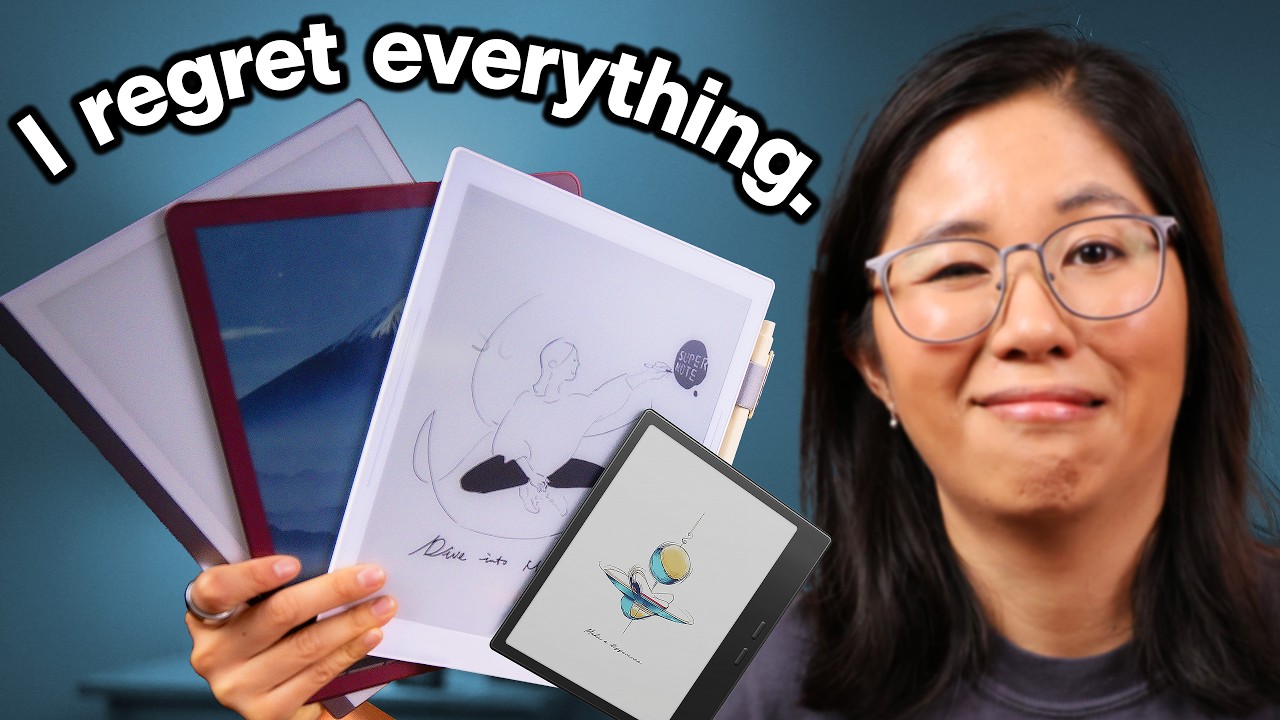
    • 4/5Thumbnail imageThe subject shows a clear grimacing expression while displaying a fan of e-ink tablets. It immediately communicates both the product category and personal dissatisfaction.A presenter wincing while holding up four e-ink devices fanned out against a clean studio background.
    • 5/5Thumbnail text“I regret everything.”Three short words that create immediate emotional tension without cluttering the frame. It flips expectations for tech gear that usually gets praised.Bold white letters with a black drop shadow at the top left reading 'I regret everything.'
    • 4/5TitleEstablishes a relatable productivity experiment with a clear time commitment. It frames a challenge that many tech-curious people have contemplated.I Spent Months Trying to Quit Paper.
    • 5/5Title + thumbnailThe title defines the experiment while the thumbnail delivers the emotional conclusion. Together they make the viewer wonder what went wrong.Title states 'I Spent Months Trying to Quit Paper' directly under the thumbnail text 'I regret everything.'

    Curiosity gap: Why did spending months and hundreds of dollars on top-tier e-ink tablets end in complete regret?

    The three hooks

    The title, the thumbnail text and the first words spoken each make a promise, and each does a different job.

    • Title“I Spent Months Trying to Quit Paper.”StoryCuriosityNoveltyIt makes the viewer want to see whether a digital paperless lifestyle is actually practical in daily work.
    • Thumbnail text“I regret everything.”Cautionary storyCuriosityLoss aversionIt makes the viewer want to discover what went wrong before they waste their own money on these devices.
    • First words spoken“I have paper everywhere.”StoryReliefCuriosityIt immediately anchors the video in a common physical mess that anyone who works at a desk recognizes.
    • PairingDifferent jobsThe title provides the premise of the productivity experiment, while the thumbnail text reveals the negative emotional verdict.
    • StakesFitsThese devices cost between $300 and $650, so testing whether they create more frustration than a $2 paper notebook addresses a genuine financial and workflow gamble.
    • UrgencyNoneThe video is an evergreen consumer inquiry and personal experiment with no artificial time constraints.

    The first 20 seconds

    TimeWhat you seeWhat you hearWhat it does
    0:00Presenter standing by a dual-monitor desk littered with open paper notebooks.I have paperShows the visual mess to establish the core problem immediately.
    0:01Comic book style text 'EVERYWHERE' pops up over the cluttered desk.everywhere.Punches up the problem with animated graphic and sound design.
    0:02Presenter looking stressed while holding a small red pocket notebook; 'NOTEBOOKS X1' graphic appears.I've got Field Notes,Starts cataloging the specific clutter items.
    0:03Top-down desk shot flipping open a large notebook; counter updates to 'X2'.a work notebook,Builds momentum showing multiple redundant notebooks.
    0:04Presenter flipping through more loose sheets on the desk.a to-do list.Completes the list of clutter items overwhelming her workspace.
    0:05Cut to studio desk shot with presenter addressing the camera directly.Now it's fine having a single notebook and pen atShifts to conversational direct address to contextualize the issue.
    0:06Presenter talks with expressive hand gestures in front of warm studio lighting.home on my nightstand,Validates reasonable paper use before contrasting with the workplace chaos.
    0:07Presenter points backward and gestures broadly.but at work,Sets up the dramatic contrast between home and desk job.
    0:08Presenter shakes hands open in frustration.[upbeat background music continues]Visual pause emphasizing workplace frustration.
    0:09Presenter shrugs and throws hands up.my desk isPrepares the viewer for the reveal of the work desk state.
    0:10Desk shot framed as a satirical breaking news broadcast labeled 'FOOTAGE FROM THE BOMBSITE'.always a disaster.Uses humorous mock-news framing to make the clutter memorable.
    0:11Close-up pan across paper sheets propped against pen organizer and monitors.[dramatic news rumble sound effect]Provides concrete visual evidence of the messy setup.
    0:12Cut back to studio presenter speaking with hands open.And there has to bePivots from problem presentation to searching for a solution.
    0:13Presenter leans forward with intent expression.a better way.Plants the core question of the video.
    0:14B-roll of presenter sitting at a clean desk writing on a thin digital slate.So, I got anIntroduces the prospective solution visually.
    0:15Side view of stylus writing on the matte screen.e-ink writing tablet toSpecifies the product category being tested.
    0:16Close-up of handwriting rendering crisply on the digital paper surface.replace it all.States the explicit mission: replacing all paper notebooks.
    0:17Overhead view of stylus jotting notes on the device next to a desk organizer.The Remarkable 2,Names the exact hardware model being reviewed.
    0:18Title banner 'Remarkable 2' pops up over the tablet view as stylus circles notes.and honestly, it'sConfirms the subject and begins the qualitative verdict.
    0:19Hand continues writing rapid task lists on the Remarkable 2 screen.[dialogue continues into review verdict]Demonstrates real-world responsiveness and feel of the device.
    0:20Close-up on screen text as writing finishes.[music rhythm carries forward]Pulls viewer smoothly into the detailed review.
    Click confirmation
    Within the first second, the screen displays a desk buried in paper notebooks while the creator states 'I have paper everywhere,' instantly confirming the title's premise about quitting paper.
    Time to the point
    0:16
    Hook
    personal confession, in the middle of the action
    Reason to stay
    To find out whether switching to the Remarkable 2 actually replaced her mess of physical notebooks or failed to deliver.
    Missing on purpose
    No channel logo intro, no greeting or self-introduction, no subscription pitch, and no sponsor banner.
    Pace and texture
    Fast and dynamic. Shot cuts occur every 1 to 2 seconds, alternating between studio talking-head, humorous meme overlays, and crisp b-roll, underpinned by steady voiceover and sound effects.

    Story map

    Versus/comparison. Betty wants to replace her messy desk notebooks with a single digital slate, but existing options are either locked behind monthly subscriptions or fail at basic note-taking. She tests three popular devices to see if any can legitimately replace paper without introducing worse headaches.

    TimeSectionNew tensionStakesTurnLoops
    0:00 –1:00The Desk Mess & The Subscription TrapCan an expensive e-ink tablet replace physical paper clutter without charging monthly fees?RiseThe reMarkable 2 cleans up the desk, but it locks basic features behind a monthly subscription on a $400 device.Opens: Is there an e-ink tablet worth buying that doesn't charge a subscription?
    1:00 –3:06Kindle Scribe: Hardware First ImpressionsDoes the market leader in e-readers offer the best writing hardware?HoldAmazon includes an eraser and a bigger screen, but the 11-inch size creates a new portability problem.Opens: How does the Scribe handle actual note-taking and daily carry?
    3:06 –4:22Sponsor Segment: Aer Day SlingHow do you carry an oversized tablet on short trips without hauling a full laptop backpack?FallSag: no turn
    4:22 –6:30Kindle Scribe: Software & Organization FailuresCan the Kindle Scribe actually organize notes and markup books cleanly?RiseWriting on PDFs works, but book notes float away and notebooks cannot be tagged, making ideas impossible to retrieve.Opens: Will a device outside the big ecosystems fix the indexing issue?Closes: Is the Kindle Scribe worth getting for note-taking?
    6:30 –8:35Boox Go Color 7: Open Android & Option ParalysisDoes an open Android OS solve software lock-in or just introduce distractions?HoldBoox offers endless app choices, but picking a model is overwhelming and the app store risks turning a focus tool into a doomscrolling screen.Opens: Does full Android ruin the note-taking experience with bad battery or poor pen feel?
    8:35 –10:41Boox Writing Experience & Daily AnnoyancesDoes Boox's deep software customization make up for hardware compromises?FallThe software has robust tagging and layering, but the stylus requires USB-C charging, has no magnetic latch, and the battery drains within a week.Opens: Can the community-favorite Supernote deliver both good hardware and smart organization?Closes: Is the Boox Go Color 7 the perfect paper replacement?
    10:41 –12:45Supernote Manta: Design & Tactile FeelIs the internet's favorite niche tablet worth over $500 without a pen or backlight?RiseThe screen initially feels like carving into soft sand, but the self-recovering film and robust linking tools nail note-taking.Opens: Does the Supernote hold up when handling real documents and books?
    12:45 –14:13Supernote Workflow & Missing FeaturesDoes the Supernote completely replace laptops and paper in daily work?HoldFree multi-cloud syncing makes it an everyday carry powerhouse, but EPUB markup errors and no backlight make the $600 total price tag hard to swallow.Opens: Which device should a viewer actually spend money on?Closes: Can the Supernote fully replace all desk tools?
    14:13 –15:24Final Verdict & Buyer BreakdownShould anyone actually buy an e-ink writing tablet?FallNone of them are flawless, so the best value for most people is still a budget e-reader combined with cheap physical paper.Closes: Is there an e-ink tablet worth getting or should you quit paper entirely?

    Payoff: delivered in part at 14:15. She admits no single device is perfect and ultimately recommends cheap e-readers with real pen and paper for most people, though she names specific use cases for the Supernote and Boox. Ending: A spoken breakdown of who should buy which device, closing on a recommendation to stick with traditional pen and paper, followed by a direct verbal and visual bridge to a fountain pen video.

    Leaks

    Where a viewer might leave. Guesses from watching, not retention data.

    • 3:06 A direct ad read for a sling bag starts after only one tablet has been lightly introduced, before the viewer sees any actual writing tests.
    • 6:55 The video pauses testing to show a screen recording of navigating confusing product catalog grids on a manufacturer's storefront.
    • 9:20 A deep dive into sideloading third-party reading apps and tweaking margin widths drags out the pacing for viewers who just want to know if the stylus works.
    • 13:20 Detailed software troubleshooting on EPUB font resizing errors bogs down the momentum right before the final verdict.

    Steal this

    1. Cataloging the clutter with on-screen counters Piles of stuff feel generic until you slap rapid-fire text tags ('NOTEBOOKS x1', 'x2') over each one, turning everyday mess into a quantified problem in under 5 seconds. 0:02
    2. The deal-breaker turnaround After praising the hero product's build quality for 10 seconds, she drops in a dramatic bass hit at 00:30 and calls out the monthly fee as 'highway robbery', resetting the mission of the entire video. 0:30
    3. The micro-friction test Instead of reading spec sheets, she tests physical annoyances that matter after week two: measuring screen diagonals with a real ruler (02:39) and testing if the stylus actually sticks magnetically (10:00). 2:39
    4. Tactile sound staging for sensory materials When explaining an unfamiliar material like a self-healing film screen, the audio drops low to amplify the scratchy, squishy Foley of the pen dragging across the display. 11:55

    Skip this

    • Relying on brands sending $500 to $600 hardware loaners for free while claiming zero sponsor influence. Viewers accept this from established tech creators with credibility, but smaller channels risk coming across as sponsored shills or out of touch with real spending.
    • Spending two minutes dissecting confusing brand website menus and model numbers. Audience affinity carries the channel through website navigation banter, but it risks boring casual viewers who only care about the physical test results.

    Open questions

    • Did the reMarkable 2 review unit belong to the creator or was it also sent by the brand?
    • How much does the Aer sponsorship placement at 03:06 impact retention curves on the channel's standard uploads?

    Teardown by Avail.video from the thumbnail, the title, the first 20 seconds and the report's notes on the whole video.

    On screen

    Everything the video showed you

    Slides, frameworks, quotes and formulas, captured verbatim with the moment they appeared. Tap any card to jump there.

    Reference shelf

    People, ideas and things mentioned

    Said means mentioned aloud; Shown means it appeared on screen.

    People1

    • BettyPresenter and technology reviewer for Switch and Click0:00Said + shown0:40Said1:04Said + shown3:03Said + shown4:22Said + shown6:51Said + shown10:42Said + shown14:16Said + shown

    Organizations1

    • Switch and ClickTechnology review YouTube channel and media brand hosted by Betty0:06Shown1:04Shown

    Things on screen10

    • reMarkable 2Monochrome digital e-ink writing tablet developed by reMarkable0:16Said + shown0:40Shown2:45Shown4:02Said + shown
    • Kindle ScribeAmazon's large-format e-ink reading and writing tablet with an 11-inch screen1:10Shown1:29Shown2:00Said2:45Shown3:15Said + shown4:02Said + shown8:05Said + shown14:21Shown
    • BOOX Go Color 77-inch Android-powered color e-ink tablet manufactured by Onyx BOOX6:43Shown7:31Said + shown7:41Said + shown7:43Shown8:35Said + shown14:21Shown
    • Supernote MantaModular 10.7-inch monochrome e-ink productivity tablet by Ratta Supernote10:54Shown11:13Shown11:14Said + shown11:26Shown12:05Said + shown12:48Said + shown14:21Shown
    • Aer Day Sling 4 Max6-liter water-resistant daily sling bag produced by Aer3:07Said + shown5:08Said + shown5:12Said
    • Aer Day Sling 4Compact 2.5-liter everyday carry sling bag produced by Aer4:00Shown4:17Shown6:42Said
    • KOReaderFree open-source ebook reading application installed on Android e-ink devices9:27Shown9:28Said + shown
    • NeoReaderNative reading application built into Onyx BOOX devices9:33Said
    • reMarkable Marker PlusStylus pen with built-in eraser designed for the reMarkable 20:23Shown
    • SuperNote Heart of Metal PenStylus with a ceramic NeverReplace nib used with SuperNote tablets11:04Shown11:14Shown
    Video description

    A description you can paste into YouTube

    A hook, a summary, chapters in YouTube's format and what the video mentions. Copy it, edit it, and paste it into YouTube Studio.

    1,350 / 5,000 characters
    By the numbers

    What YouTube shows about this video and its channel

    As of Oct 28, 2026. YouTube's public numbers first, then Avail.video's own arithmetic on them.

    The video

    Views
    680.8K
    Likes
    10.9K
    Comments
    963
    Published
    May 20, 2026
    Length
    15:24
    Category
    Science & Technology
    YouTube's topics
    Lifestyle (sociology)
    Captions
    No
    HD
    Yes
    Language
    English
    Paid promotion
    None declared
    Made for kids
    No
    License
    Standard YouTube

    Creator's tags

    No tags

    The channel

    Subscribers
    1.4M
    Videos
    1.1K
    Total views
    304.7M
    Channel age
    6 years (since Jan 2020)
    Country
    United States
    Uploads
    about every 2 days
    Across the last 11 long-form uploads
    Before this video
    —

    Calculated by Avail.video from YouTube's public numbers

    Outlier score
    1.8× · Above typical
    Views against the median of the channel's last 11 long-form uploads
    Views per subscriber
    0.47
    Likes vs the channel's usual
    1.1× the channel's usual
    1.6% of views vs a usual 1.5%
    Comments vs the channel's usual
    1.2× the channel's usual
    0.14% of views vs a usual 0.12%
    Rank among recent uploads
    #3 of 12
    By views: this video and the channel's last 11 long-form uploads
    Take it to your AI

    Ask Claude or ChatGPT about this video

    Copy this report as context, paste it into a chat, then ask anything. It includes timestamps, so answers can point back to the video.

    Then ask
    • Turn the main ideas into a checklist I can use this week.
    • What are the strongest claims in this video, and what evidence does it give for each?
    • Write a short summary for someone who hasn't watched it, linking the key moments.
    • Quiz me on this video, one question at a time, and cite the timestamp for each answer.

    Watched by Avail.video · 2026-10-28